
The Oreem Send page is our online booking page for deliveries inside Bahrain. Enter the pickup and delivery details, choose the vehicle and the delivery speed, see the rate and continue to payment. An Oreem courier collects your parcel and delivers it, with prices from BHD 0.8 including VAT, and you can book any day from 8 AM to midnight.
Individuals, home businesses and shops across Bahrain trust Oreem to collect and deliver their parcels on time.
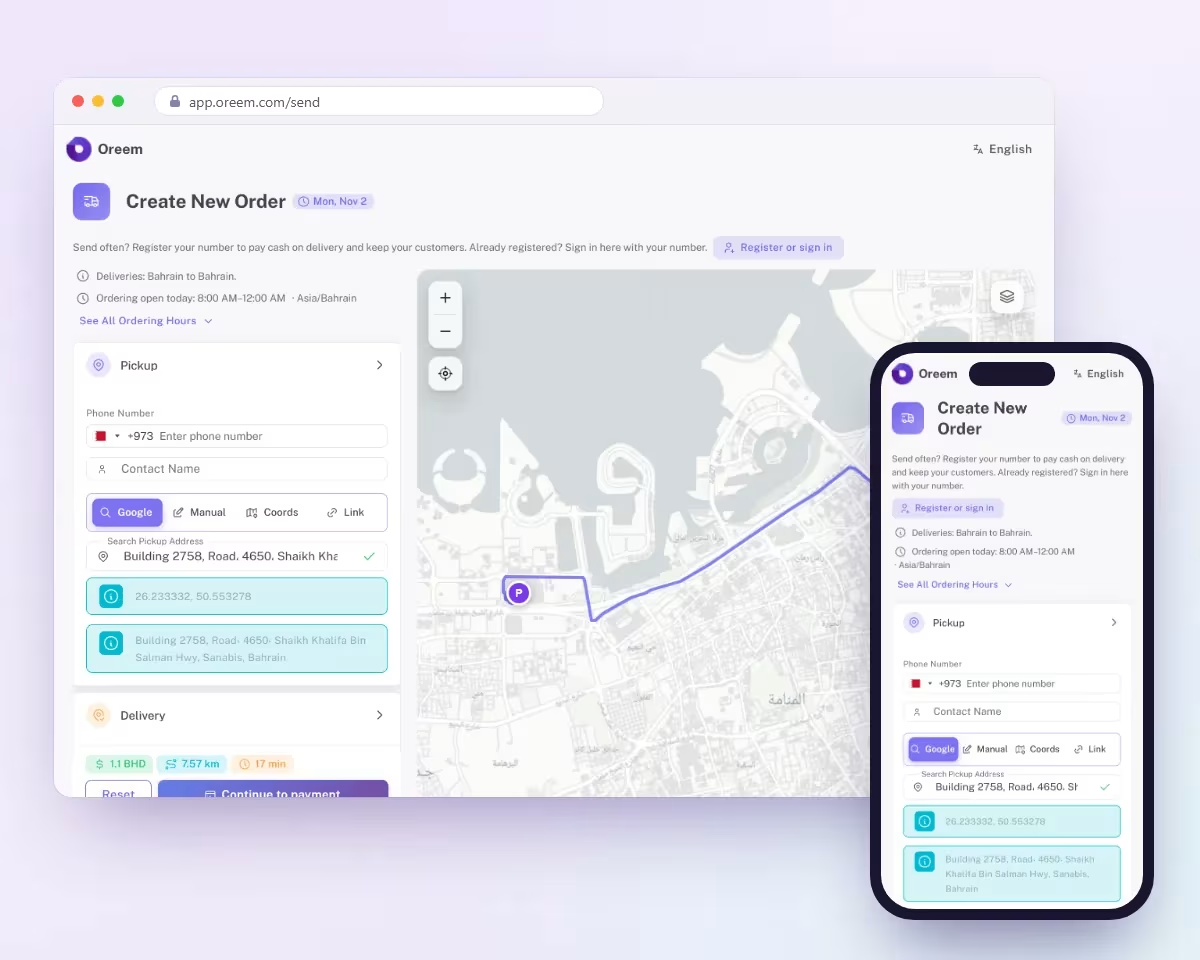
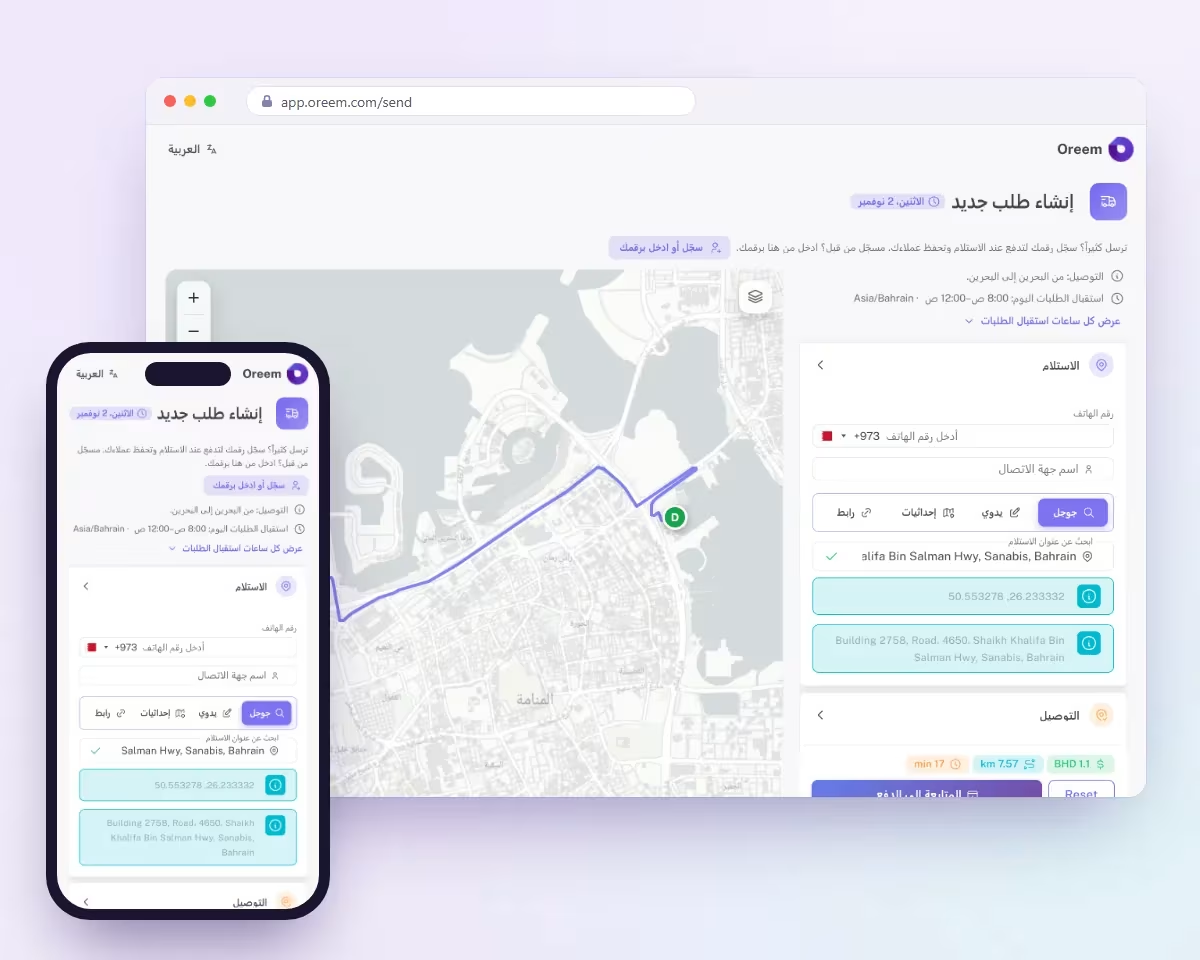
These are the real screens of the Oreem Send page at app.oreem.com/send. It opens in the browser on your phone or computer, so there is nothing to install.
Open app.oreem.com/send and you land on Create New Order. The top of the page shows the ordering hours for today, currently 8:00 AM to 12:00 AM every day, and confirms that deliveries are from Bahrain to Bahrain. The language button switches the page between English and Arabic, and the map shows your route once both addresses are in.


In the Pickup card, enter the phone number of the person handing over the parcel and a contact name; the +973 code is already set. Then find the address. The quickest way is Google: start typing a building, a shop or a place, and pick it from the list. The page fills in the full address and the exact coordinates, and a pin appears on the map.


Each address can be entered in four ways. Google searches for the place by name. Manual lets you choose the Block and type the Road, Building and Flat or Unit, the way most addresses in Bahrain are written. Coords takes the latitude and longitude, and Link takes a Google Maps link that someone sent you; press Resolve to read it. With Coords and Link you can also add an address description to help the courier find the door.


Open the Delivery card and fill it in the same way for the receiver: phone number, contact name and address, using any of the four address options. Once both addresses are confirmed, the map draws the route from the pickup point, marked P, to the delivery point, marked D.


In Order Details, pick the Vehicle Type: Bike, Car, Bus, 6-Wheeler or Tow Truck. Then pick the Delivery Method: Instant Delivery, Same Day Delivery, 3 Hours Delivery or Next Day Delivery. Bike with Same Day Delivery is selected by default. Below them you can set a schedule, a delivery window with the earliest and the latest time the receiver is available, your own order reference, an items description and special instructions for the courier.


When both addresses are complete, the page calculates the delivery rate and shows the fee, the distance and the estimated time. Check them, then press Continue to payment to pay and confirm your order. Reset clears the form if you want to start again. All local delivery prices include VAT, and registered senders can pay cash on delivery.
From City Centre Bahrain to the Bahrain National Museum, by bike, Same Day Delivery
Calculated on the live page in November 2026. Your rate depends on the distance, the vehicle and the delivery method.


Open the Send page, add the two addresses and see your price before you pay.
Local delivery with Oreem starts from BHD 0.8 for next-day and BHD 1.1 for same-day by bike, VAT included, 7 days a week from 8 AM to 1 AM. You choose the vehicle and the delivery speed; the price rises with distance.
| Vehicle | Next-day | Same-day | 3 hours | Express / Instant (90 min) |
|---|---|---|---|---|
| Bike | 0.8 | 1.1 | 1.25 | 2.2 |
| Car | 0.8 | 1.3 | 1.5 | 2.2 |
| Van (without workers) | 10 | 10 | 10 | 10 |
Starting prices per order in BHD, VAT included. The price rises with distance; the van is a flat BHD 10. Prices updated:
| Service | Book by | Delivery promise |
|---|---|---|
| Express / Instant | 11 PM | Pickup and drop-off within 90 minutes |
| 3 hours | 8 PM | Within 3 hours |
| Same-day | 9 PM | The same day |
| Next-day | 12 AM (midnight) | The next day |
Local delivery runs 7 days a week, including public holidays, from 8 AM to 1 AM. Prices updated:
When you continue to payment, the rate for your order is already calculated, so you know the price before you confirm. Every Oreem order has tracking, so you can follow the parcel until it reaches the receiver; you can also check a delivery on our tracking page. If you are sending for a shop, add your own order reference so the order is easy to find in your records. If the receiver is only available at certain times, set the delivery window when you book. Need help with a booking? Our support team is available every day from 8 AM to midnight.
At a Glance:
 The rate is shown before payment Tracking on every order Support from 8 AM to midnight


If you run a shop, a home business or an Instagram store, register your phone number on the Send page. Registered senders can pay cash on delivery and keep their customers for the next orders, and if you are already registered you simply sign in with your number. If you sell online and need Oreem to collect the payment from your buyers, read about cash on delivery in Bahrain: it is free inside Bahrain, and the money reaches your wallet within 1 to 2 working days. For daily volumes or storing your stock with us, see order fulfillment or contact our team.
For Regular Senders:
Register or sign in with your number Pay cash on delivery Keep your customers for the next orders
From one gift to a day of shop orders, these guides cover the most common deliveries:
Gift delivery for birthdays and occasions.
Medicine delivery from pharmacies to homes.
Our same-day guide explains cut-off times.
Sending documents to the GCC and worldwide.
Return deliveries for shops and buyers.
E-commerce delivery for online sellers.
Retail shop delivery for stores across Bahrain.
Open the Oreem Send page at app.oreem.com/send, add the pickup and delivery details, choose the vehicle and delivery speed, check the rate and continue to payment.
No. You can book without registering. If you send often, register your number to pay cash on delivery and keep your customers for the next orders.
Prices start from BHD 0.8 for next-day and BHD 1.1 for same-day delivery by bike, VAT included, and rise with distance. The exact rate is shown before you pay.
Booking is open every day from 8 AM to midnight. Book by 11 PM for Express or Instant, by 9 PM for same-day, by 8 PM for 3-hour delivery and by midnight for next-day.
Deliveries are from Bahrain to Bahrain, across the areas reachable by road. Areas that can only be reached by boat, such as Hawar, are not served.
The Send page is for deliveries inside Bahrain. For the GCC and international shipping, see our prices page or contact us.
Contact Us
Have questions?
Get answers.
Booking
Do I need the app?
No. The Send page opens in your phone or computer browser.
Can I book for later?
Yes. Set a schedule and a delivery window in Order Details.
Prices
Does the price include VAT?
Yes. All local delivery prices include VAT.
Why does my rate change?
The rate depends on the vehicle, the delivery speed and the distance.
Payment
How do I pay?
Continue to payment after you check the rate.
Can I pay cash?
Registered senders can pay cash on delivery. Register or sign in with your number.

 English
 العربية